There is a good chance someone in your office has already used ChatGPT for work.
Maybe they asked it to clean up an email. Maybe they pasted in a rough proposal and asked it to make the wording better. Maybe they used it to summarize a long vendor message because they were buried and just needed the short version.
That part does not bother me much. People are going to use useful tools.
The part that does bother me is when a business has no rules at all, so every employee makes up their own version of what is safe. One person uses a company approved tool. Another uses a personal ChatGPT account. Someone else installs a browser extension because it looked helpful. Nobody is trying to cause a problem, but company data starts drifting into places the business does not manage.
For a small business, that can become a privacy and security mess pretty quickly.

The risky part is what gets pasted
Most employees are not thinking, "I am about to leak company data." They are thinking, "I need to get this done before lunch."
That is how sensitive information ends up in AI tools.
A client sends a long email, so someone pastes it into ChatGPT and asks for a summary. A manager writes a few notes about an employee issue and asks AI to turn it into something more professional. A salesperson drops in part of a proposal. An office admin asks for help with a spreadsheet that includes customer names, invoice numbers, or balances.
None of those examples sound dramatic. That is exactly why they happen.
The problem is not that AI is evil or useless. The problem is that the business may have no idea what was copied, where it went, which account was used, or whether the tool was approved in the first place.
Some information should stay out of personal AI accounts
Here is the rule I would give employees: if you would not put it in a public Facebook post, do not paste it into a personal AI tool.
That covers more than people think.
Customer names and contact lists should stay out. So should contracts, quotes, invoices, pricing sheets, passwords, MFA backup codes, API keys, payroll information, HR notes, legal documents, insurance paperwork, and internal emails about clients or staff.
Helpdesk tickets are another one people forget about. A ticket can include names, phone numbers, computer names, screenshots, login problems, addresses, software issues, and sometimes way more than anyone intended to share.
Even if the AI provider has decent privacy settings, your business still has a basic control problem. You may not know whose account was used. You may not know if chat history was enabled. You may not know if a browser plugin had access to the page. And if that employee leaves, you may have no useful record of any of it.
That is not a good place to be.
Personal ChatGPT is different from a managed business tool
This is where the conversation gets muddy for a lot of companies.
An employee using a personal AI account is not the same as the company rolling out Microsoft Copilot or another managed business AI tool. With a personal account, the employee usually controls the login, settings, browser extensions, saved history, and connected apps. The company is mostly out of the loop.
With a business setup, you may have admin controls, company sign in, security policies, audit logs, retention settings, and better control over how data is handled. I say "may" because the plan and setup matter. The name on the product does not magically make it safe.
Microsoft Copilot, ChatGPT business plans, and other AI tools can be useful. But they should be configured like business software, not treated like a random website employees found on their own.
You probably need a short AI policy, not a 20 page document
Small businesses do not need a giant policy that nobody reads. A one page version is usually a better start.
It should answer a few plain questions:
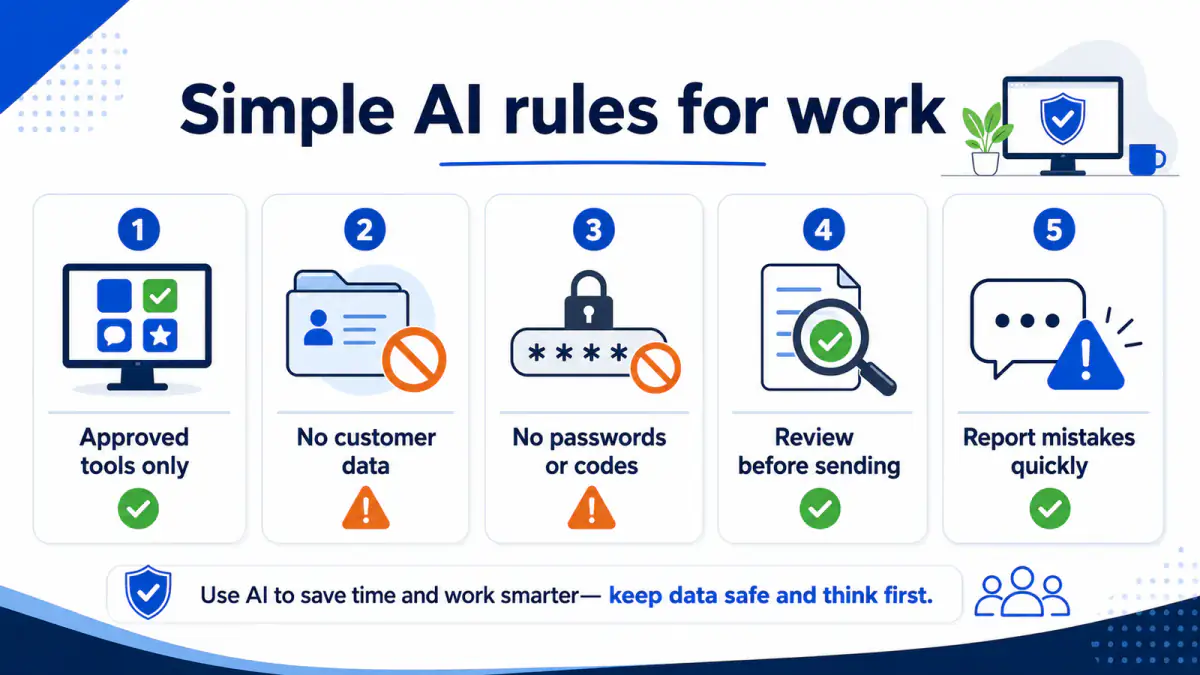
- Which AI tools are approved for work?
- Are personal AI accounts allowed for company tasks?
- What information is never allowed to be pasted into AI?
- Who approves new AI apps, browser extensions, or plugins?
- Does a human need to review AI written emails, proposals, or policies before they go out?
- What should an employee do if they accidentally pasted something sensitive?
That last one matters. People are more likely to report a mistake if they know they will not immediately get crushed for it. You want to know early, not three months later.
The policy does not have to sound scary. It just has to remove the guessing.
There are safe ways to use AI at work
I would not tell most businesses to block AI completely. That is usually not realistic, and it can push people into using tools quietly.
There are plenty of reasonable uses.
An employee can ask AI to rewrite a generic email with no customer details. They can ask for Excel formula help using fake sample data. They can draft a meeting agenda. They can brainstorm questions for a vendor call. They can clean up public website wording or turn rough notes into a checklist.
The habit to teach is simple: strip out the private details first.
Instead of pasting a real client email, write something like this:
"A customer is upset because a project is two weeks behind. Help me write a professional reply that acknowledges the delay and gives them a next step."
No customer name. No contract amount. No email thread. No private details. You still get a useful draft.
That is the kind of difference employees need to understand.
A good first step: ask what people are already using
Before buying anything or blocking everything, ask your team a simple question: "What AI tools are you using for work right now?"
You may get a few awkward answers. That is fine. The point is to find out what is already happening.
From there, decide what should be approved, what should be blocked, and what needs a company account. If you use Microsoft 365, this is also a good time to look at your security settings, sharing permissions, login protection, retention policies, and data protection settings. AI policy is harder to enforce if the rest of the environment is loose.
For most small offices, the first round should be practical:
- pick the approved AI tools
- require company accounts where possible
- write the short policy
- block risky extensions or unknown AI apps if needed
- train staff on what not to paste
- decide who reviews AI generated work before clients see it
That is enough to get moving.
How Manage IT can help
Manage IT helps Milwaukee area businesses put practical technology rules in place without making daily work harder than it needs to be.
For AI, that might mean reviewing Microsoft 365, checking security and sharing settings, helping choose approved tools, blocking risky apps, writing a simple employee policy, or training staff on what is safe to use and what should stay inside the company.
AI is already showing up in normal office work. Ignoring it probably is not a plan. A better move is to set a few clear rules now, before client data, employee notes, or financial information ends up somewhere you cannot control.
If you are not sure what your employees are using, or whether your Microsoft 365 setup is ready for AI tools, Manage IT can help you review it and put a simple plan in place.

Powerful IT Systems · Sussex, WI
Master's degree in Computer Science with 15+ years of hands-on IT experience serving Milwaukee-area businesses.