
There is no single "best" IT company for every Milwaukee business.
A three-person office that needs occasional computer help should not buy the same service as a 60-person manufacturer with two locations, Microsoft 365, production systems, cyber insurance requirements, and a server that cannot go down.
I run a managed IT company, so I have an obvious point of view. But if you are comparing providers, the useful question is not, "Who says they are the best?" It is this:
Which provider can show that it will respond quickly, reduce preventable problems, protect the systems you rely on, and take clear ownership when several vendors are involved?
This guide explains how to compare Milwaukee-area IT providers, what different support models cost, which questions expose weak service, and where Powerful IT Systems may or may not fit.
Start with the right support model
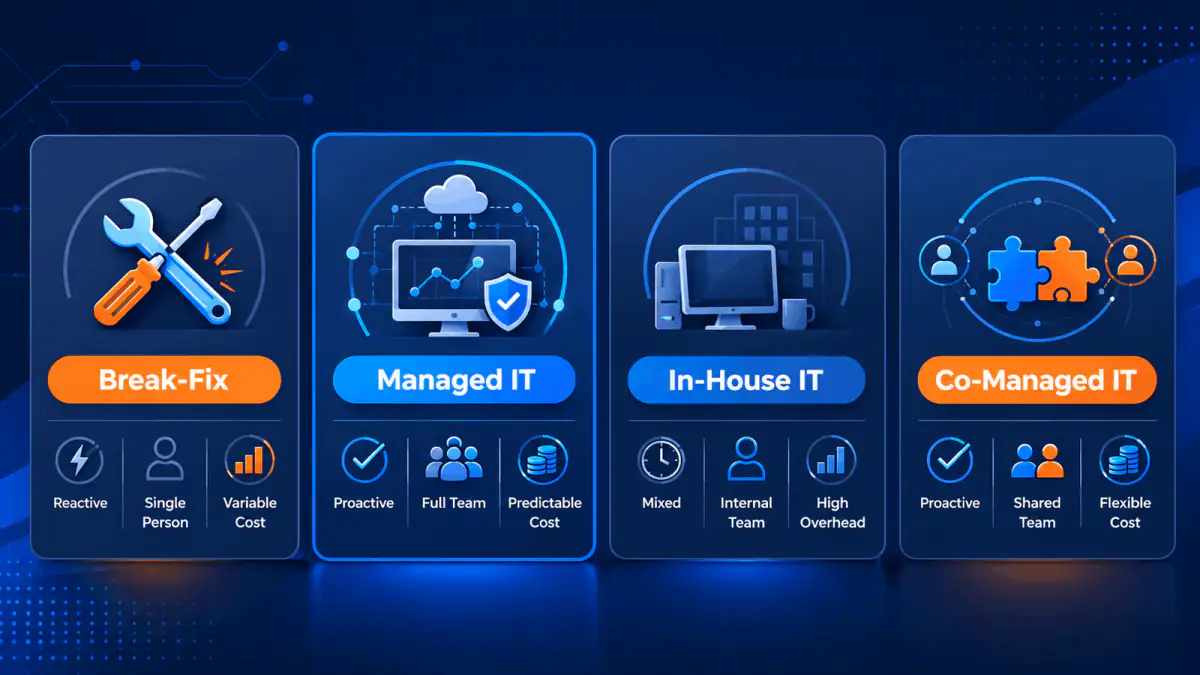
Before comparing companies, decide what you are actually buying. Break-fix support, managed IT, in-house IT, and co-managed IT solve different problems.
| Support model | How it works | Usually fits | Main limitation |
|---|---|---|---|
| Break-fix | You call when something fails and pay by the hour or incident. | Very small offices with simple systems and low dependence on technology. | Little incentive or budget for monitoring, documentation, security, or prevention. |
| Managed service provider (MSP) | An outside team manages support, maintenance, security, backups, cloud systems, and planning for a recurring fee. | Small and midsize organizations that need an IT department but do not want to staff every specialty. | Quality and scope vary widely. The contract and service data matter more than the label "MSP." |
| In-house IT | Employees manage the environment as their primary job. | Larger or highly specialized organizations that need daily internal ownership. | One hire rarely covers helpdesk, infrastructure, cloud, security, projects, and after-hours coverage. |
| Co-managed IT | Internal IT keeps leadership and business context while an MSP supplies tools, coverage, and specialists. | Organizations with one or more IT employees who need extra capacity or security depth. | Responsibilities must be written down or work will fall between the teams. |
Break-fix is not automatically bad. It can be the economical choice for a small office that can tolerate downtime and has little sensitive data. It becomes expensive when recurring outages, security gaps, or employee delays start affecting the business.
Managed IT is a better fit when technology needs ongoing ownership, not just occasional repair.
What in-house IT actually costs
Salary comparisons are often oversimplified. An MSP is not a direct replacement for every internal role, and an internal employee brings business knowledge that an outside provider has to earn.
Still, the wage data shows why a small business cannot reasonably expect one employee to cover every IT specialty.
The latest national medians published by the U.S. Bureau of Labor Statistics are:
| IT role | Median annual wage | Approximate monthly salary | Primary responsibility |
|---|---|---|---|
| Computer user support specialist | $60,340 | $5,028 | Employee support and routine troubleshooting |
| Network and systems administrator | $96,800 | $8,067 | Servers, networks, identity, systems, and maintenance |
| Information security analyst | $124,910 | $10,409 | Security controls, monitoring, risk, and incident response |
| IT manager | $171,200 | $14,267 | Planning, budgeting, vendors, policy, and leadership |
| Four-role total | $453,250 | $37,771 | Broad internal IT capability |
These are May 2024 national median wages, which were the latest BLS occupational medians available when this guide was updated. They exclude payroll taxes, benefits, recruiting, paid time off, training, software tools, and equipment. A small company would not necessarily hire all four roles. The point is that "one IT person" and "a complete IT function" are not the same purchase.
For many companies with roughly 10 to 200 computers, an MSP or a co-managed arrangement provides broader coverage at a lower cost than building a complete internal department. Once the business is large enough to need constant internal coordination, an IT manager plus an MSP can be more effective than choosing only one model.
Break-fix versus managed IT
| Area | Break-fix service | Managed IT service |
|---|---|---|
| Billing | Hourly or per incident | Recurring, usually based on users, devices, locations, or scope |
| Incentive | Revenue increases when more work breaks | Provider benefits when the environment stays stable and support demand falls |
| Monitoring | Usually limited or absent | Continuous endpoint, server, network, and service monitoring should be included |
| Patching | Performed when requested or during a repair | Scheduled, measured, and followed up when devices fail to update |
| Security | Often sold as separate products | Core controls should be built into the managed plan |
| Backups | May be installed but not actively verified | Backup jobs, alerts, retention, and restore tests should have an owner |
| Documentation | Often stored in the technician's notes | Environment, vendors, credentials, standards, and changes should be documented |
| Planning | Usually project-driven | Regular technology reviews, lifecycle planning, and budgeting |
| Best fit | Simple environments that can accept risk and variable cost | Businesses that need predictable ownership and lower operational risk |
The difference is not whether the provider sends a monthly invoice. Some companies sell "managed IT" but still operate like break-fix shops. The difference is whether they measure the environment, prevent repeat problems, maintain security controls, and own the result.
How to tell a weak MSP from a mature one
Do not compare providers only by their tool lists. Most MSPs can buy similar software. Compare their operating discipline.
| Warning sign | Stronger evidence | What to ask for |
|---|---|---|
| "We respond fast." | Response and resolution performance is reported by priority. | Show the last 90 days of median first-response time by ticket priority. |
| "We provide cybersecurity." | The agreement names the controls, monitoring owner, escalation path, and exclusions. | Which controls are included, who reviews alerts, and what happens after hours? |
| "Your data is backed up." | Restore points are monitored and test restores are documented. | When was the last successful restore test, and what are our RPO and RTO? |
| "We patch everything." | Patch compliance is measured, exceptions are tracked, and failed installations are remediated. | What percentage of managed devices met the patch target last month? |
| "We offer 24/7 service." | The provider distinguishes monitoring, emergency response, and a staffed helpdesk. | Who answers at 2 a.m., for which events, and is there an extra charge? |
| "We handle compliance." | The provider maps technical controls and evidence to the customer's requirements. | What do you manage, what does the client retain, and what do you explicitly not certify? |
| "Everything is included." | The agreement clearly identifies included support, excluded projects, after-hours terms, and license costs. | Show three examples of work that would create an extra invoice. |
| "We know your network." | The client can review current diagrams, inventories, vendors, warranties, and recovery information. | What documentation do we receive if we leave? |
| "We guarantee uptime." | The SLA defines the measured service, calculation, exclusions, and remedy. | Is the SLA for provider response, managed equipment, the internet connection, or cloud services? |
A mature MSP should be comfortable answering these questions before you sign. If every answer is "trust us," keep looking.
Put the security claims under pressure
Security is no longer a separate annual project. It is part of normal account, endpoint, network, backup, and vendor management.
The 2026 Verizon Data Breach Investigations Report found that 31% of breaches began with exploitation of software vulnerabilities. Its small and midsize business section included 7,152 confirmed breaches and noted that smaller organizations are disproportionately affected by ransomware while often having fewer resources.
That does not mean every small business needs an enterprise security department. It does mean an MSP proposal in 2026 should clearly address:
- Multi-factor authentication and administrator account separation
- Endpoint detection and response, including who monitors alerts
- Microsoft 365 or Google Workspace security
- Operating system and third-party application patching
- Email phishing and malicious-link protection
- Managed firewall configuration and network segmentation where needed
- Backup isolation, retention, alerting, and tested recovery
- Employee security awareness training
- Incident escalation, cyber-insurance coordination, and evidence preservation
- User onboarding and offboarding with prompt access removal
Be careful with compliance language. An IT provider can implement controls, maintain evidence, and support HIPAA, PCI DSS, SOC 2, CMMC, or insurance requirements. It cannot guarantee that your entire organization is compliant simply because it installed security software.
Read uptime and response claims correctly
An uptime percentage sounds objective, but it is meaningless until the provider defines what is measured.
| Availability target | Maximum downtime per year | Maximum downtime per month, averaged |
|---|---|---|
| 99.9% | 8 hours 46 minutes | 43 minutes 50 seconds |
| 99.95% | 4 hours 23 minutes | 21 minutes 55 seconds |
| 99.99% | 52 minutes 34 seconds | 4 minutes 23 seconds |
An MSP does not control every Microsoft, internet, power, or software-vendor outage. A useful SLA should explain:
- Which managed services are covered
- How downtime is measured
- What is excluded
- The response target for each incident priority
- The escalation path
- The service credit or other remedy if the target is missed
Also separate response time from resolution time. A five-minute acknowledgement is useful, but the buyer also needs to know when an engineer begins work, how updates are communicated, and how long similar incidents typically take to resolve.
Local support still matters, but define it
Most day-to-day support can be handled remotely. Onsite availability matters when a firewall fails, a server will not boot, a network closet needs work, a new office opens, or a conference room stops working before an important meeting.
Ask each Milwaukee-area provider:
- Where are the technicians actually based?
- Which cities are included in standard onsite coverage?
- Is onsite labor included or billed separately?
- What is the target for an emergency dispatch?
- Is after-hours onsite support available?
- Will the same team know your environment, or will each visit start from zero?
Do not award points just because a company has a local address. Local value comes from practical dispatch coverage, knowledge of the environment, and accountability after the technician leaves.
Calculate the cost of downtime for your own business
Generic "downtime costs businesses millions" statistics are not helpful to most Milwaukee companies. Use your own numbers.
For example, if 25 employees with a loaded labor cost of $45 per hour cannot work for two hours:
25 × $45 × 2 = $2,250 in direct labor cost
That still excludes lost sales, production delays, missed appointments, overtime, recovery labor, customer impact, and contractual penalties. A manufacturing line, medical clinic, law firm, and nonprofit will have very different exposure. A useful MSP should help you identify the systems that create the greatest operational loss and set recovery priorities accordingly.
How Powerful IT Systems compares
Powerful IT Systems is an owner-operated MSP based in Sussex. We support businesses across Milwaukee, Waukesha County, and surrounding Southeast Wisconsin communities with remote and onsite service.
Our managed plans combine helpdesk support, endpoint and server management, patching, cybersecurity, backups, Microsoft 365 or Google Workspace administration, network management, vendor coordination, and technology planning. Current plan details and pricing are published on our website so a buyer can review the starting point before scheduling a call.
Here is the evidence a prospective client should verify rather than simply accepting our claims:
- Response: During business hours (Monday to Friday 8 AM to 5 PM, Saturday 9 AM to 1 PM (Central)), critical issues get a first response within 15 minutes, high-priority issues within 1 hour, and normal requests same business day. After-hours emergency support is included on the Premium plan only. Ask us how the targets are measured.
- Local coverage: Our team is based in Sussex and provides onsite support across the Milwaukee metro when remote work is not enough.
- Security scope: Security is built into both of our plans. Both plans include 24/7 SOC monitoring and EDR. Premium adds email security, MFA, dark web monitoring, security awareness training, and compliance support. Review the current control list and exclusions in the proposal.
- Pricing: We publish plan pricing and an online estimator. Confirm which projects, licenses, after-hours work, and hardware are outside the monthly fee.
- Flexibility: Standard service is offered without a long-term agreement. Any promotion or project with different terms should state them clearly.
- Client record: At the time this guide was updated, our site displayed 71 Google reviews with a 5.0 rating. Read the newest reviews, the critical reviews if any, and the provider's responses instead of relying only on the average.
- Experience: Our case studies cover healthcare, professional services, nonprofits, manufacturing, and other local organizations. Ask for the examples closest to your size, systems, and risk profile.
We are usually a good fit for an organization that:
- Has about 10 to 200 computers, with our strongest fit often around 30 to 60
- Depends on Microsoft 365, cloud applications, networks, and line-of-business systems every day
- Wants one team to own support, security, backups, vendors, and planning
- Needs local onsite help in addition to remote support
- Values predictable cost, documentation, and security standards
We are probably not the right fit if you want residential computer repair, a one-time cheap fix with no ongoing management, or an IT provider that will leave unsupported systems and serious security gaps untouched. In those cases, a break-fix provider or a narrowly scoped consultant may be the better choice.
Questions to ask every Milwaukee MSP
Use the same questions with every provider so the comparison is fair:
- What is included in the monthly fee, and what creates an extra charge?
- What are your median first-response and resolution times by priority?
- Who answers critical issues after hours?
- Which security controls are included, and who monitors them?
- How do you measure patch compliance and handle devices that fail to update?
- How often do you test restores, and how are RPO and RTO documented?
- What onsite area do you cover, and what is the emergency dispatch target?
- Which parts of our Microsoft 365, network, phones, and vendor relationships will you own?
- What documentation will we be able to review and export?
- How do you handle onboarding, offboarding, and privileged accounts?
- What does your onboarding process require from our current provider?
- If we leave, how will you transfer credentials, documentation, licensing, and administrative access?
The bottom line
The best Milwaukee IT support company is not necessarily the largest or the least expensive. It is the provider whose service model fits your business and whose claims can be verified.
Compare ownership, response data, security scope, backup testing, documentation, local coverage, contract terms, and real client work. Then choose the team that gives you the clearest answers.
If Powerful IT Systems appears to fit, review our managed IT plans, case studies, and Google reviews, or schedule a short discovery call. If we are not the right match, the questions in this guide should still help you choose a better provider.
Sources
- Google Search Central, Creating helpful, reliable, people-first content
- Google Business Profile Help, Tips to improve your local ranking on Google
- U.S. Bureau of Labor Statistics, Network and Computer Systems Administrators
- U.S. Bureau of Labor Statistics, Computer Support Specialists
- U.S. Bureau of Labor Statistics, Information Security Analysts
- U.S. Bureau of Labor Statistics, Computer and Information Systems Managers
- Verizon, 2026 Data Breach Investigations Report
- Verizon, 2026 DBIR Executive Summary

Powerful IT Systems · Sussex, WI
Master's degree in Computer Science with 15+ years of hands-on IT experience serving Milwaukee-area businesses.